从萌生想法,到鼓起勇气面试,蹉跎半年终于成行。
走出舒适区,拥抱变化,为新的挑战做准备, 愿一切都好~
Introduce?
今天终于确定了可以转作iOS,没有预想的那么开心,有些压力。自己去年的考核还是棒棒哒,不知道转BG后,上半年的考核会变成啥样,感觉会成背锅侠,呜呜,人家不想当背锅侠(:/cry)
但是不看money(不看money,看啥(:/抠鼻)),看未来的发展,觉得自己是对的,是明智的,坚信不能在该拼搏学习的年纪安逸度日!
今天狠下心注册了苹果的开发者账号,惊奇的发现苹果变善良了,开发者账号居然苹果全平台可用了,瞬间感觉99刀花的值了~ 为了让自己更有动力,和男朋友打了个1000软妹币的赌注,2017年一定要提交一个作品!!!
写了个小程序 Pitch Perfect,第一次用开发者账号在真机运行,记录一下遇到的问题。
Prepare
add device to Apple ID devices
Xcode7 之后真机调试也不用证书了,但是我还是加了下,学习下流程。
itunes 中查看手机的 UDID,然后登陆 Apple 的 Member Center,添加设备的 UDID。
Create Project
process symbol files
创建工程后运行,弹出提示:process symbol files.
google 了下这个阶段,Xcode到底在做什么,以下来自 stack overFlow
It downloads the (debug) symbols from the device, so it becomes possible to debug on devices with that specific iOS version and also to symbolicate crash reports that happened on that iOS version.
Since symbols are CPU specific, the above only works if you have imported the symbols not only for a specific iOS device but also for a specific CPU type. The currently CPU types needed are armv7 (e.g. iPhone 4, iPhone 4s), armv7s (e.g. iPhone 5) and arm64 (e.g. iPhone 5s).
So if you want to symbolicate a crash report that happened on an iPhone 5 with armv7s and only have the symbols for armv7 for that specific iOS version, Xcode won’t be able to (fully) symbolicate the crash report.
after “Processing Symbol Files”, a folder containing symbols associated with the device (including iOS version and CPU type) was created in ~/Library/Developer/Xcode/iOS DeviceSupport/ like this: 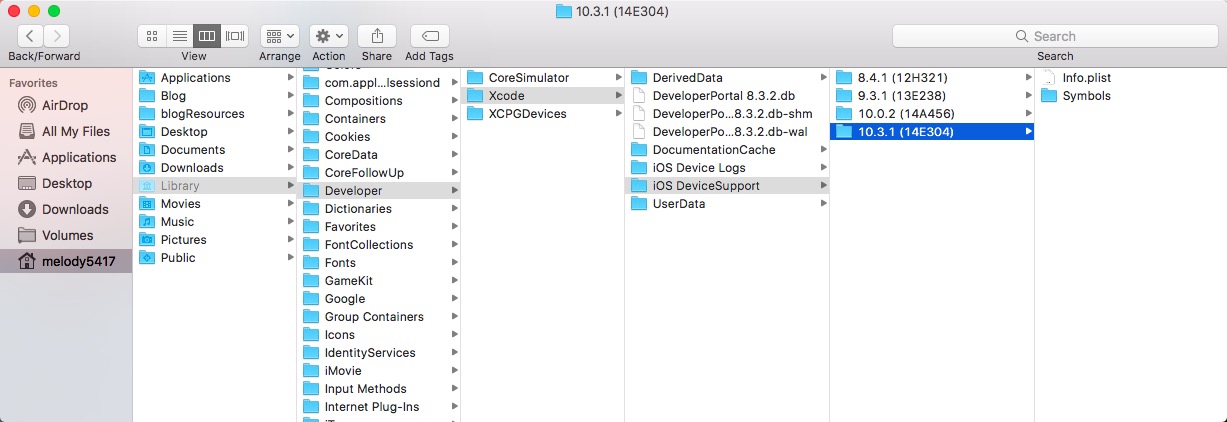
couldn’t launch
连接上设备后,应用仍然无法运行,弹出提示: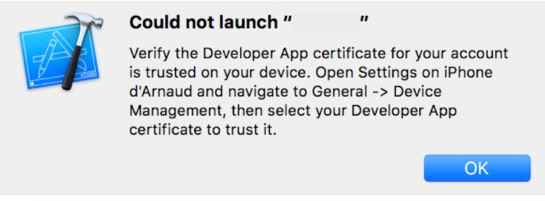
此时就按提示做,解锁设备,打开 设置->通用->设备管理->开发者应用,然后信任开发者,再验证应用。
NOTE:这里trust操作必须联网才可完成,否则会报错。
关于联网验证问题,查了Apple的官方文档:
You must be connected to the Internet to verify the app developer’s certificate when establishing trust.
If you’re behind a firewall, make sure that it’s configured to allow connections to https://ppq.apple.com.
If you aren’t connected to the Internet when you trust an app, the device displays “Not Verified” instead.
To use the app, connect to the Internet and tap the Verify App button.
关于联网验证 stack overflow 还有一些其他方法绕过,具体不再细究。
OS_Activity_Mode
想要真机运行真是磨难重重,又一拦路虎:
if we’re in the real pre-commit handler we can’t actually add any new fences due to CA restriction.
这个问题就是添加环境变量 OS_Activity_Mode 并置 disable.
RUN
PitchPerfect 应用是录制声音并进行音高速率的变化的小应用,需要访问麦克风。真机跑起来,点击录制,随即 crash,报错:
This app has crashed because it attempted to access privacy-sensitive data without a usage description.
The app’s Info.plist must contain an NSPhotoLibraryUsageDescription key with a string value explaining to the user how the app uses this data.
按照错误指引,在 Info.plist 中添加了Key: NSPhotoLibraryUsageDescription。具体如下:
|
|
描述字符串自己随意填写就可以,但是一定要填写,不然会引发包无效的问题,导致上传打包后构建版本一直不显示。
Final
就像开篇写的一样,拥抱变化,迎接挑战,Hack On ~